

Skip to content
All articles
Stripe··1 min read

Creating a Campaign and Connecting your Stripe Account To Campaign

As a project creator you are now ready to create a campaign and connect your stripe account to your CrowdFunding campaign. Here are a few short steps showing how to do this.

STEP 1. Once you have created your campaign, head to the ‘Funding’ tab and click ‘Connect with Stripe’.
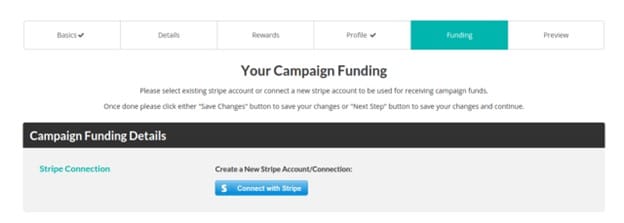
STEP 2. This will redirect you to Stripe, you will need to login if you haven’t done so or fill out the form. You can skip the form if you are in ‘Development Mode’ (you must be logged in to your stripe account as well).

STEP 3. Now you can select your stripe account in the drop down, based on the account email. Live and Test connections will be labelled.
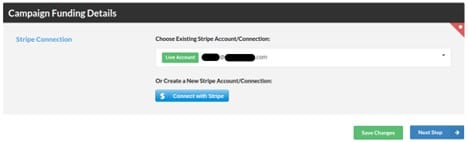

STEP 4. Fill out the rest of the information for your campaign and after all fields are filled out, you can now send it for review.

Keep reading

Fundraising Tips·3 min read

Mastering the Art of Crowdfunding for Education

Crowdfunding has revolutionized the way individuals raise funds for various causes, and education is no exception. With the rise of innovative platforms like Lite Tuition, students now have a powerful tool to make their…

Read
Success Tips·3 min read

Navigating the College Search Process: A Parent’s Guide

Introduction: The college search process can be an overwhelming and exciting time for both parents and students. As a parent, it’s essential to provide guidance and support while empowering your child to make informed…

Read

Your education, funded by people who believe in you.

Start a campaign in minutes — it's free, and funds go straight to your school. No loans, no debt.